

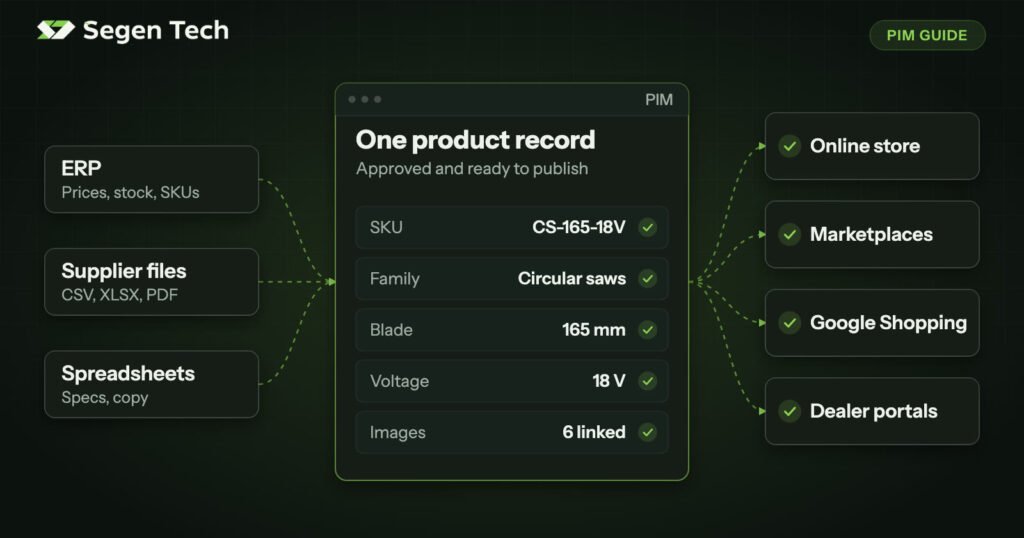
A PIM (product information management system) is software that gives a business one place to collect, structure, enrich, approve and publish its product information. Instead of specifications living in spreadsheets, ERP fields, supplier files and store admin screens, the PIM holds one approved product record and sends the right version to every channel.
That is the short answer to “what is PIM?” The more useful questions are what it changes in your daily work, and whether your business has reached the point where it pays off. This guide covers both, with manufacturers and distributors in mind.
What is a PIM used for, and what does it store?
A PIM holds everything needed to describe and sell a product, as opposed to the data needed to run the transaction.
- Identifiers: SKU, GTIN, manufacturer part number and supplier part numbers.
- Technical attributes: dimensions, voltage, material, certifications and anything else a buyer filters or compares on.
- Commercial content: titles, descriptions, feature lists and search terms.
- Classification: product families, categories and the mappings to each channel’s own categories.
- Relationships: variants, bundles, kits, accessories, spare parts and replacement products.
- Asset references: links to the images, manuals and data sheets for each product.
- Channel and market values: translated copy, regional specifications and channel-specific titles.
Stock levels, costs, orders and invoices normally stay in the ERP. The PIM may read some of those values and pass them along, but it is not where they are managed.
How a PIM works, in five stages
- Collect. Data comes in from the ERP, supplier files and existing spreadsheets, and each source is mapped to your attributes.
- Structure. Each product joins a family that defines which attributes apply, what units they use and which values are allowed.
- Enrich. People and automation fill the gaps. Completeness scores show exactly what is still missing for each channel.
- Approve. Roles and workflows control who can edit what, and what must be reviewed before it goes out.
- Publish. Each channel receives its own version of the record, in the format that channel requires.
Take an 18 V circular saw as an example. The SKU and price start in the ERP. The blade diameter and no-load speed come from the supplier’s PDF. Marketing writes the description. Your store needs a short title and filter values, a distributor wants a CSV in metric units, and Google Shopping wants a GTIN and a brand.
Without a PIM, someone retypes those details for each destination, and the copies drift apart. With a PIM, each destination is a mapping from the same record. When the specification changes, you change it once.
What manufacturers and distributors need from a PIM
Both have complex catalogs, but the problem starts in a different place.
| Manufacturers | Distributors | |
|---|---|---|
| Main problem | Accurate data exists, but it is locked in ERP fields, engineering files and PDFs | Data arrives from many suppliers, each with its own format and naming |
| Typical sources | ERP, engineering documents, product managers | Supplier spreadsheets, price files, data sheets |
| Typical outputs | Own website, dealer portals, distributor data files, printed catalogs | Webstore, marketplaces, punchout or customer-specific catalogs |
| What to get right first | The attribute model for each family, plus variants and spare-part relationships | Supplier mapping, value normalization and de-duplication |
A distributor might receive “Voltage”, “V”, “Volt (DC)” and “Rated voltage” from four suppliers. They all mean the same thing, and a customer filtering by voltage should never have to know that. Much of a distributor’s PIM value comes from resolving exactly this kind of inconsistency once, in rules, rather than every time a new file arrives.
Signs you are ready for a PIM
A PIM becomes worth it when product information is maintained by several people, for several channels, from several sources. Watch for these signs:
- Thousands of SKUs with dozens of attributes per product.
- The same data being copied by hand between the ERP, spreadsheets and your store.
- Supplier data arriving in different formats every week.
- A separate version of the catalog for each channel or region.
- Product launches held up by missing specifications or images.
- No approval step, so anyone can change anything.
If three or more of these are true, a PIM will usually pay for itself.
When you don’t need a PIM yet
If you sell on one channel with a modest catalog, your ecommerce platform is often enough. A well-kept spreadsheet with agreed column definitions can also carry a small team for a long time.
A PIM also won’t fix a problem nobody has defined. If your team can’t agree what a product family is, or who owns the specifications, new software just gives that disagreement a nicer interface. Settle those questions first. They are cheap to answer now and expensive to answer in the middle of a project.
How a PIM differs from an ERP, a DAM and an MDM
These systems overlap, which is why they are often confused.
- ERP: runs the business. It owns transactions, stock, cost and pricing.
- DAM (digital asset management): stores and governs media files such as images, video and manuals.
- MDM (master data management): keeps core records consistent across the whole company, including customers and suppliers as well as products.
- PIM: makes product information complete, consistent and ready to sell on each channel.
Our guide to PIM vs ERP vs DAM goes through which system should own each product field.
The three types of PIM
- Open-source PIM: self-hosted platforms with full control over data and hosting, and no per-user licence fees. You take on the hosting and upkeep.
- SaaS PIM: managed platforms with a faster start and ready-made connectors. You work within the vendor’s model and pricing.
- Custom PIM: purpose-built for unusual product structures, strict hosting or compliance needs, or tight integration requirements. You own the code and take on its maintenance.
Akeneo, Pimcore, Salsify and inriver are some of the best-known products. We mention them for orientation only. The right choice depends on your catalog, team, integrations and budget, so a shortlist should come after you understand your data, not before.
What implementing a PIM involves
The software is rarely the hard part. Most failed PIM projects fail on data modelling: how families, variants, bundles and kits behave, which attributes apply where, and which values are controlled lists. Our implementation checklist sets out the full sequence, from the first audit to go-live.
A typical first phase takes 8 to 16 weeks, usually with one category, one channel or one data source going live first. Larger programmes are phased so that working value arrives early. If you want help scoping one, our PIM implementation services start with the data model and stay platform-neutral.
Frequently asked questions
What does PIM stand for?
PIM stands for product information management. The term can refer to the practice or to the software that supports it.
Is a spreadsheet a PIM?
No. A spreadsheet can store product data, but it can’t enforce allowed values, control who edits what, track completeness per channel or publish to several destinations. It works until several people and channels depend on it.
Does a PIM replace an ERP?
No. They do different jobs and are usually connected. The ERP remains the home of stock, cost and transactions, and passes the data it owns to the PIM.
Is a PIM only for large companies?
No. Catalog complexity matters more than company size. A small distributor with 20,000 SKUs from 40 suppliers may need a PIM long before a much larger company selling 200 simple products.
Do I need a PIM for one Shopify store?
Usually not, unless your catalog has many attributes per product or several people and suppliers feeding it. Adding marketplaces, dealers or regional stores is often what changes the answer.
Not sure whether you need one?
Start by counting your sources, channels and the people who edit product data, then look at how many of the signs above apply. If the answer still isn’t clear, tell us about your catalog. We’ll give you a straight answer, including when the answer is that you don’t need a PIM yet.